
In this guide on how to set Rolex Explorer 2, we’ll walk you through every step, explain how each function works, and share practical tips to avoid mistakes. Keep reading to learn exactly how to set your Explorer II and get the most out of its unique features.
Rolex Explorer II Overview
The Rolex Explorer II builds on the legacy of the original Explorer I, which Rolex introduced in 1971 for adventurers and professionals who needed durability, legibility, and precision in extreme conditions.
While the Explorer I focused on simplicity, the Explorer II adds an independent hour hand and a fixed 24-hour bezel, letting you track two time zones or distinguish day from night in dark environments like caves or polar regions.
The watch delivers accurate timekeeping and reliable performance, and its solid Oystersteel case, luminous Chromalight markers, and smooth Triplock crown provide durability and comfort for everyday wear.
Rolex designed the jumping local hour function so you can adjust your local time instantly without affecting your reference time. This dual-time feature, along with the readable 24-hour display, gives travelers and professionals a precise, versatile, and durable watch they can rely on anywhere.
Rules Before Setting a Rolex Explorer II
Before adjusting your Rolex Explorer II, it’s important to handle it carefully to avoid damaging the movement or other delicate components. Following proper precautions ensures smooth operation and protects the watch’s long-term accuracy.
Use these key rules to prepare your watch for safe and precise time and date adjustments.
- Ensure the watch is clean and dry. Dust or moisture near the crown can enter the case when opened.
- Turn the crown slowly to avoid stressing the gears.
- Wind the watch if it has been idle. A fully powered movement stabilizes the hands during setting.
- Work in a well-lit area to clearly see hand positions and crown clicks.
- Avoid setting the date near its natural change window (around midnight) to prevent tension on the mechanism.
Handle each crown position deliberately and avoid rushing to protect your watch’s longevity.
How to Set the Reference (24-Hour) Time on a Rolex Explorer II
You set the reference time on a Rolex Explorer II by adjusting the minute hand and 24-hour hand together while the crown is in the final setting position. This step locks in your home or primary time zone, which stays fixed even as the local hour hand moves independently later.
Follow these steps carefully for accurate results:
- Step 1: Unscrew the Crown
Turn the crown counterclockwise until it releases from the case. Make sure you feel the crown pop out smoothly so you can reach the setting positions without resistance.
- Step 2: Pull the Crown to the Final Click (Minute + 24-Hour Hand Setting)
Gently pull the crown all the way out to the last position. This stops the seconds hand and links the minute and reference hands for precise synchronization.
- Step 3: Rotate Minute Hand to Set the 24-Hour Hand to Reference/Home Time
Turn the crown to move the minute hand. As the minute hand moves, the 24-hour hand follows at the correct rate. Continue rotating until the reference hand lines up with your chosen home time.
- Step 4: Use 24-Hour Format (e.g., 18:00 instead of 6 PM)
Confirm you are reading the reference time in true 24-hour format. This prevents AM/PM mistakes and keeps your secondary time zone accurate on the fixed bezel. - Step 5: Set Seconds Precisely With Atomic Time
Wait for the top of the next minute on a trusted atomic clock. When the second hand hits zero, push the crown in slightly until the second hand restarts and matches the exact reference time. - Step 6: Push Crown to Next Position
After the reference time is set, press the crown one click inward. This moves you into the position needed to set the local hour hand later, without affecting the 24-hour display.
How to Set the Local Time on a Rolex Explorer II (Independent Jumping Hour Hand)

You set the local time on a Rolex Explorer II using the independent jumping hour hand, which moves in one-hour increments without stopping the minute or second hands. This feature allows you to adjust your current time zone quickly while keeping your reference (24-hour) time stable.
Follow these steps to set your local time accurately:
- Step 1: Pull Crown to the Second Click
Gently pull the crown to the second position. This unlocks the hour hand for independent movement while the movement continues running. - Step 2: Jump the Hour Hand in One-Hour Steps
Rotate the crown clockwise or counterclockwise to move the hour hand one hour at a time. Each jump updates the local time without affecting the minute or 24-hour reference hand. - Step 3: Advance Past Midnight to Change the Date
If your local time crosses midnight, the date will change automatically. Use this feature to make sure that the calendar reflects the correct day in your current time zone. - Step 4: Set Exact Local Time Without Affecting Minutes/Seconds
Adjust the hour hand until your local time matches your reference without touching the minutes or seconds. This keeps the watch accurate for both zones simultaneously. - Step 5: Push Crown Back and Screw It Down Fully
After confirming your local time, press the crown back into its normal position and screw it down tightly. This maintains water resistance and protects the movement from dust or moisture.
How to Set the Date on a Rolex Explorer II
You set the date on a Rolex Explorer II using the local hour hand, as the date changes only when the local hour hand passes midnight. The 24-hour reference hand does not affect the calendar.
Follow these steps to adjust the date correctly:
- Step 1: Set Local Hour Hand to Correct AM/PM
Make sure your local hour hand displays the correct AM or PM period. This prevents the date from changing at noon and keeps it updating correctly at midnight. - Step 2: Jump Past Midnight to Advance One Date
Rotate the local hour hand past midnight. Each full cycle advances the date by one day without affecting the 24-hour hand or minute hand. - Step 3: Continue Hour-Hand Cycling Until Correct Date Appears
Keep moving the local hour hand past midnight repeatedly until the display shows the correct date. Avoid rotating too quickly to prevent stress on the date mechanism. - Step 4: Confirm Correct Date Alignment
Check that the date is fully centered in the window and aligns with the hour hand. Misalignment can affect legibility and accuracy. - Step 5: Screw Down Crown to Maintain Water Resistance
After setting the date, push the crown back and screw it down completely. This preserves the watch’s water resistance and protects the movement from dust or moisture.
How to Use the Rolex Explorer II as a Dual-Time or GMT Watch
You can use the Rolex Explorer II as a dual-time or GMT watch by combining the fixed 24-hour bezel with the reference hand. This allows you to track your home time and local time at the same time accurately.
Follow these steps to use the dual-time function:
- Step 1: Set 24-Hour Hand to Home Time (Reference)
Adjust the reference hand to your home or reference time. This hand remains fixed to provide a constant point of reference while traveling. - Step 2: Set Local Time With Jumping Hour Hand
Use the independent jumping hour hand to adjust the current local time. This changes only the hour, leaving the reference hand and minutes untouched. - Step 3: Use 24-Hour Hand for Second Time Zone
Read the reference hand against the bezel to monitor your home time or any second time zone without moving the bezel. - Step 4: Read Home Time Directly Without Bezel Rotation
The combination of the fixed bezel and the reference hand lets you read your home or reference time at a glance. This makes managing two time zones easy while keeping the watch fully functional.
How to Recognize AM/PM on a Rolex Explorer II
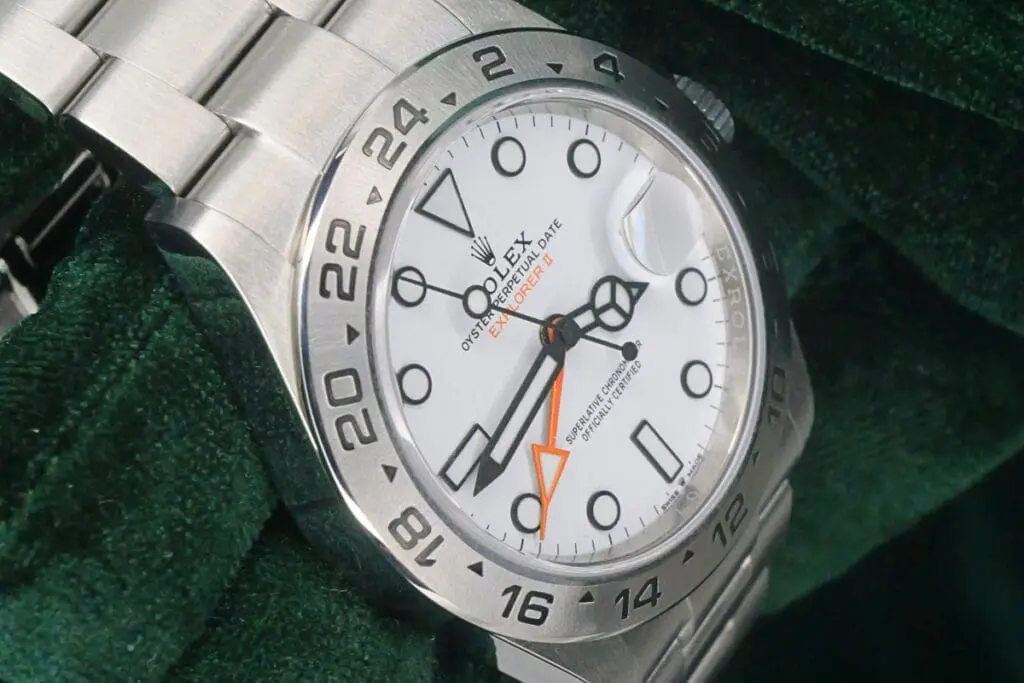
You can recognize AM and PM on a Rolex Explorer II by using the reference hand and the fixed bezel. The reference hand completes one full rotation in 24 hours, helping you distinguish morning from afternoon.
When the reference hand points above 12 on the bezel, it indicates afternoon or evening hours (12:00–23:59). When it points below 12, it shows morning hours (00:00–11:59).
This method helps you avoid confusing AM with PM when setting the local hour hand or reading your home time. Using the reference hand this way also prevents incorrect date changes and keeps dual-time tracking accurate.
Common Mistakes When Setting a Rolex Explorer II
Many Rolex Explorer II owners make specific mistakes that can affect the accuracy of each function. Understanding these errors helps you protect the movement, avoid misalignment, and maintain reliable dual-time functionality.
1. Setting Local Time Before Setting the 24-Hour Reference Time
Adjusting the local hour hand before setting the 24-hour reference hand can cause confusion with your home time. The reference hand sets the foundation for dual-time tracking, so it must be set first. Skipping this step may result in misaligned time zones and inaccurate dual-time display.
2. Confusing the Reference Hand With the Local Hour Hand
Many users mistakenly think the reference hand moves like a standard hour hand. The reference hand only tracks home or reference time, while the local hour hand jumps independently. Confusing them can cause errors in AM/PM display or incorrect date changes.
3. Forgetting That the Date Changes Only With the Local Hour Hand
The date on the Explorer II advances only when the local hour hand crosses midnight. Moving the reference hand or minute hand does not affect the date. Ignoring this can lead to frustration when the calendar does not update as expected.
4. Misreading AM/PM When Setting the 24-hour Hand
Setting the reference hand without understanding its 24-hour rotation can cause AM/PM mistakes. Hours above 12 indicate afternoon or evening, while hours below 12 indicate morning. Misreading this can make the date change at noon instead of midnight.
5. Using Excessive Force When Unscrewing the Crown
Applying too much force while unscrewing the Twinlock crown can damage the threads or crown tube. The crown should pop out smoothly when turned counterclockwise. Rough handling can compromise water resistance and make future adjustments difficult.
6. Forgetting to Screw Down the Crown After Setting
Failing to screw the crown down tightly after adjustments exposes the movement to dust, moisture, and water. This can cause internal corrosion or damage to the movement. Always secure the crown fully to maintain the watch’s 100-meter water resistance.
How Often Should You Adjust the Time and Date?
You should adjust the time and date on a Rolex Explorer II whenever the watch stops or when you change time zones. The automatic movement, depending on the caliber (3187 or 3285), has a power reserve of 48–70 hours, so adjustments may be needed after the watch sits idle for two to three days.
For daily wear, minor corrections are rarely necessary because the Explorer II maintains precise accuracy within ±2 seconds per day, as certified by COSC. When traveling across time zones, adjust the independent jumping hour hand to match your local time without affecting the 24-hour reference hand.
Date adjustments are only needed when the local hour hand passes midnight incorrectly, such as after the watch has been unused for a while or after crossing the International Date Line. Regularly checking and making minor corrections keeps the time and calendar accurate while protecting the movement and maintaining long-term reliability.
Useful Tips for Setting a Rolex Explorer II
You can set a Rolex Explorer II more accurately and safely by following specific practical tips. These strategies protect the movement, improve precision, and make adjustments faster without risking damage to the watch.
- Use a Soft Cloth Under the Watch: Place the watch on a soft, clean cloth while setting it. This prevents scratches on the case or bezel and provides a stable surface for precise and safe crown adjustments.
- Avoid Magnetic Fields: Keep the watch away from smartphones, speakers, and magnetic devices while adjusting. Strong magnetic fields can temporarily affect the movement’s accuracy, leading to incorrect time readings.
- Rotate Hands Slowly: Always turn the crown slowly when adjusting the hands. Fast rotation can stress the gear train and reduce long-term accuracy. Smooth, deliberate movements preserve the internal components.
- Set Time Before Bed: Adjust the time in the evening when the watch is off the wrist. Cooler temperatures help the lubricants in the movement remain stable, which improves the accuracy of the mechanical gears.
- Align Hands Precisely: When stopping the seconds hand to set time, make sure both the minute and 24-hour hands align exactly with markers. Slight misalignment can cause reading errors in both reference and local time.
- Keep a Time Reference: Use a trusted atomic clock or smartphone as a reference when setting the watch. Synchronizing carefully helps the 24-hour hand, minute hand, and seconds hand start accurately together.
- Check Date Before and After Adjustment: Always review the date before adjusting the hour hand and verify it afterward. This helps the date mechanism cycle correctly and prevents accidental misalignment with AM or PM.
- Wind Periodically Even If Not Worn: Even when not worn, wind the watch every two weeks. This keeps the lubricants inside the Caliber 3187 or 3285 movement evenly distributed, preventing stiff gears or uneven wear over time.
- Avoid Adjusting During Quickset Date Change: Do not adjust the hour or date during the watch’s automatic date-change period (around 10 PM–2 AM). This protects the date mechanism from strain or internal misalignment.
- Maintain a Comfortable Grip: Hold the crown gently between your fingers when turning. A firm but relaxed grip reduces the risk of slipping, which could damage the crown threads or scratch the case.
Final Thoughts on How to Set Rolex Explorer II
Setting your Rolex Explorer II can feel overwhelming at first, but once you understand how each hand works, you’ll get the rhythm quickly. Take your time, stay patient, and trust yourself—you’ll get smoother each time you adjust it. Always double-check the crown before and after setting, and give the watch a gentle look-over the next day to make sure everything is running as expected.
If something feels off, don’t force it; your watch will always reward careful handling. With steady practice and a little confidence, you’ll keep your Explorer II running perfectly wherever you go.
FAQs About Setting a Rolex Explorer II
Does the Explorer II have a quickset date?
No, the Rolex Explorer II does not have a traditional quickset date function. The date advances only when the local hour hand passes midnight. You must rotate the local hour hand in one-hour increments past midnight to change the date, ensuring correct AM/PM alignment for accurate calendar operation.
Why does the date change when I move the hour hand?
The date on your Rolex Explorer II changes when your hour hand passes midnight because it is connected directly to that hand. This ensures your calendar updates correctly with your local time. You can move the hour hand safely without affecting the minute or other functions.
How do the 24-hour and local hour hands differ?
Your hour hand moves in one-hour steps to match local time, while the minute hand moves continuously to track minutes. This design lets you adjust your watch quickly without affecting the date or timekeeping, making it easy to set your Rolex Explorer II accurately whenever you need.
Why doesn’t the 24-hour hand move when I change local time?
The hour hand is independent and shows your reference or home time. Adjusting the local hour hand does not affect it because the Explorer II uses a jumping hour mechanism, letting you change local time instantly without disrupting the accuracy of your reference time.